
Contents
Invisalign Tray Not Fitting? 2026 Guide to Tracking Issues, Fixes & When to Call Your Orthodontist
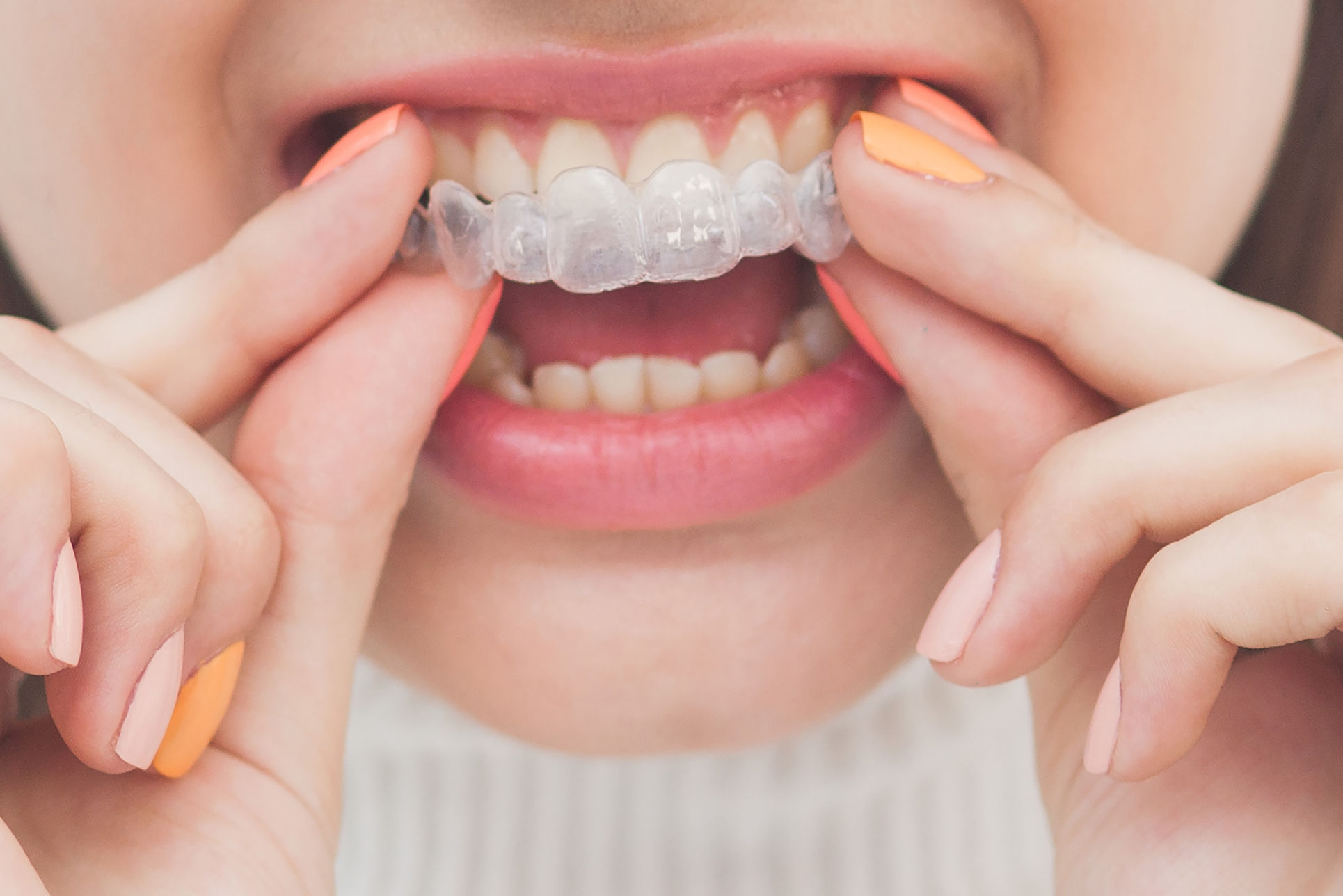
You open the sealed bag, pop in your next set of Invisalign clear aligners, and immediately something feels wrong. The plastic lifts away from one tooth, a gap appears along the biting edge, or the tray rocks when you bite down. If this scenario sounds familiar, you are far from alone. Research presented at the 2025 American Association of Orthodontists annual session estimated that up to 22 percent of Invisalign patients experience at least one tracking deviation during treatment. The good news is that a poorly fitting tray almost never means your treatment has failed -- it simply means something needs to be adjusted, and there are clear, well-established protocols to get you back on track.
This comprehensive 2026 guide covers every aspect of the problem: the biomechanics behind tracking failures, the most common causes ranked by frequency, home remedies you can try tonight, professional interventions your orthodontist may recommend, the costs involved, and prevention strategies based on the latest evidence. Whether you are on tray 5 or tray 35, this article will give you the knowledge to act quickly and confidently.
Understanding Invisalign Tracking and Why Trays Stop Fitting
Every Invisalign tray is a snapshot of where your teeth should be at a specific point in your treatment timeline. The ClinCheck software that your orthodontist uses divides the total planned tooth movement into tiny increments -- usually 0.25 mm of translation or 1 to 2 degrees of rotation per aligner stage. When you swap to a new tray, it should fit snugly because your teeth have already moved into the position the previous tray was guiding them toward. The slight misfit of the new tray is what generates the biomechanical force that pushes teeth the next fraction of a millimeter.
"Tracking" is the term orthodontists use to describe how well your real-world tooth positions match the computer-predicted positions. Perfect tracking means zero gap between tooth and aligner. A tracking failure means one or more teeth have not completed their planned movement, so the next tray does not seat fully. The visible sign is typically a crescent-shaped air gap between the incisal (biting) edge of a tooth and the inner surface of the aligner.
"In my practice, roughly one in five Invisalign cases requires at least one mid-course correction due to tracking loss. It is not a complication -- it is a normal part of digital orthodontics." -- Dr. Sarah Chen, Board-Certified Orthodontist, San Francisco, 2025 AAO Panel Discussion
Key Concept: Active vs. Passive Fit
A brand-new tray should feel tight (active fit) because it is engineered to be slightly ahead of your current tooth position. Over the course of 7 to 14 days, as teeth move, the fit becomes more relaxed (passive fit). If a new tray feels immediately loose or passive, that is actually a bigger concern than one that feels tight -- it may indicate you accidentally skipped a stage or received a manufacturing defect.
Common Causes of Poor Aligner Fit in 2026
While tracking failures can arise from many factors, orthodontic literature consistently identifies a handful of primary causes. Below is a ranked breakdown based on data compiled from multiple clinical studies and provider surveys through early 2026.
| Cause | Estimated Frequency | Severity | Patient-Controllable? |
|---|---|---|---|
| Insufficient daily wear time (<20 hrs/day) | ~50% of all tracking failures | Moderate to High | Yes |
| Complex tooth movements (rotations, extrusions) | ~20% | Moderate | No |
| Detached or poorly bonded attachments | ~12% | Moderate | No |
| Premature switch to next tray | ~8% | Moderate | Yes |
| IPR not performed or insufficient | ~5% | Moderate | No |
| Aligner manufacturing defect | ~3% | Low to Moderate | No |
| Patient anatomy (short clinical crowns, conical teeth) | ~2% | Low | No |
Insufficient Wear Time: The Number One Culprit
Align Technology and independent researchers agree: the minimum recommended wear time is 20 to 22 hours per day. That leaves only 2 to 4 hours for eating, drinking anything other than water, and oral hygiene. Many patients underestimate how quickly those hours add up. A 30-minute breakfast, a 45-minute lunch, a one-hour dinner, and two 15-minute brushing sessions already consume 2 hours and 45 minutes. Add a coffee break or an after-dinner snack and you are well below the threshold.
Studies using TrayMinder and similar compliance-tracking apps show that self-reported wear time is often 2 to 3 hours higher than actual measured wear time. In other words, patients who believe they are wearing aligners 22 hours a day may actually be wearing them only 19 to 20 hours. Over a two-week tray cycle, that shortfall compounds and can produce clinically significant tracking loss.
Warning: The "Weekend Effect"
Orthodontists report that tracking problems frequently appear on Monday mornings, after patients have left aligners out for extended social meals, parties, or travel over the weekend. Even a single 5-hour gap during an event can stall tooth movement enough to derail the next tray change. If you know a long event is coming, plan to wear your aligners right up until you sit down to eat, and put them back in as soon as you finish.
Complex or Resistant Tooth Movements
Not all tooth movements are created equal. Aligners excel at certain movements and struggle with others. The most predictable movements include mild crowding relief, arch expansion, and tipping movements. The least predictable movements -- those most likely to cause tracking loss -- include:
- Canine rotation greater than 15 degrees: Round root morphology makes canines prone to relapse mid-tray.
- Premolar extrusion: Pushing a tooth out of its socket requires sustained vertical force that clear plastic struggles to deliver.
- Molar distalization without anchorage support: Moving molars backward is force-intensive and often requires elastics.
- Lateral incisor torque: Small, tapered lateral incisors provide minimal surface area for the aligner to grip.
"The biggest myth in clear aligner therapy is that every tooth movement is equally achievable. In reality, we plan cases knowing that certain movements may need refinements. That is built into the treatment timeline." -- Dr. James Morrow, Diplomate, American Board of Orthodontics, 2026 Webinar on Aligner Biomechanics
Attachment and SmartForce Feature Failures
Invisalign attachments are small, tooth-colored composite bumps bonded to specific teeth. They act as handles that allow the aligner to grip the tooth and deliver forces that flat plastic alone cannot generate. When an attachment debonds -- due to biting into hard food, grinding, or a bonding failure -- the aligner loses its mechanical advantage on that tooth. Common signs of a debonded attachment include: a tooth-colored bump found in your aligner tray or in food, a smooth spot on your tooth where the bump used to be, or a sudden looseness in how the aligner fits over that particular tooth.
Align Technology's SmartForce features, including Pressure Points and Precision Wings for Class II correction, rely on extremely precise geometry. Even slight warping of the aligner from hot water exposure can alter these features enough to reduce their effectiveness.
How to Diagnose a Tracking Problem at Home
Before contacting your orthodontist, you can perform a quick self-assessment to understand the severity of the problem. Here is a systematic approach:
- The Mirror Test: Smile wide in front of a well-lit mirror. Look for visible air gaps between the aligner edges and your teeth, particularly along the front teeth.
- The Finger Press Test: Press gently on the aligner over each tooth. If it clicks or snaps downward onto a tooth, it was not fully seated -- a Chewie session may fix it.
- The Bite Test: Close your teeth together gently. If the aligner rocks or pivots, multiple teeth may not be tracking.
- The Photo Comparison: Take a close-up photo and compare it to the ClinCheck animation your orthodontist shared. Look for teeth that appear behind schedule.
| Gap Size | Severity Level | Recommended Action |
|---|---|---|
| Less than 1 mm on one tooth | Mild | Use Chewies 3-5 min, 4x daily for 2-3 days; continue current tray |
| 1-2 mm on one tooth | Moderate | Use Chewies aggressively; consider back-tracking; call orthodontist |
| More than 2 mm on one tooth | Severe | Stop advancing; return to last well-fitting tray; call orthodontist ASAP |
| Any gap on 3+ teeth | Severe | Stop advancing; contact orthodontist immediately for re-evaluation |
Proven Solutions for an Ill-Fitting Invisalign Tray
Once you have assessed the scope of the problem, the next step depends on severity. Below is a detailed look at the three main solution categories, from simplest to most involved.
Using Aligner Chewies Effectively
Aligner Chewies -- small cylindrical cushions made from Styrene Copolymer -- are the first line of defense against mild tracking gaps. They work by distributing gentle, sustained pressure that pushes the aligner fully onto your teeth, eliminating air pockets that prevent force delivery.
The correct technique matters more than most patients realize:
- Target the problem tooth first: Place the Chewie directly over the tooth with the gap and bite down firmly for 10 to 15 seconds, then release. Repeat 10 to 15 times.
- Work across the full arch: After targeting the problem area, move the Chewie from molar to molar, biting down on each tooth for 5 seconds. This ensures even seating.
- Frequency is key: Use Chewies for 3 to 5 minutes every time you reinsert your aligners -- after meals, after brushing, and before bed.
- Replace worn Chewies: Once a Chewie loses its springiness, it is no longer applying sufficient force. Replace them every 2 to 3 weeks.
Pro Tip: The Nighttime Chewie Routine
Many orthodontists now recommend a dedicated "Chewie session" right before bed. Since you will be wearing your aligners for 7 to 8 uninterrupted hours of sleep, maximizing the seat quality at bedtime gives your teeth the longest possible window of ideal force application. This single habit can resolve many mild tracking issues within 48 to 72 hours.
Back-Tracking to a Previous Aligner Stage
If Chewies alone do not close the gap within 2 to 3 days, back-tracking is the standard next step. This means going back to the previous aligner (or even two stages back) and wearing it for an extended period -- typically 5 to 10 additional days -- to give your teeth time to complete the movement that was falling behind.
This is why orthodontists universally recommend keeping your last two sets of aligners. If you have discarded them, contact your provider's office. In many cases, Align Technology can manufacture a replacement of a specific stage within 5 to 7 business days.
Warning: Never Skip Ahead
Some patients, frustrated by a poor fit, assume that jumping forward to the next tray might solve the problem. This is the worst possible approach. Each successive tray assumes the previous movements are complete. Skipping ahead will compound the tracking error, potentially requiring a full rescan and new set of aligners -- adding months to your treatment and potentially hundreds of dollars in additional cost.
Professional Interventions and Mid-Course Corrections
When home remedies are insufficient, your orthodontist has several clinical tools available:
- Interproximal Reduction (IPR): Controlled removal of a fraction of a millimeter of enamel between teeth to create space for movement. This is painless and removes less enamel than a single bite of an apple does.
- Attachment rebonding or repositioning: If an attachment has fallen off or is poorly placed, your orthodontist will clean the tooth, re-etch, and bond a new attachment.
- Aligner trimming: Carefully trimming the gingival (gum-line) edge of an aligner can sometimes relieve an interference point that prevents full seating.
- Mid-course correction (rescan): For significant tracking loss across multiple teeth, a new intraoral scan is taken and sent to Align Technology. A revised set of aligners is fabricated from the teeth's current positions -- not where they were supposed to be. This typically adds 2 to 4 weeks to the treatment timeline while the new trays are manufactured.
- Auxiliary devices: Your orthodontist may add elastics (rubber bands), Precision Cuts for elastic attachment, or even temporary mini-screws for anchorage in complex cases.
Cost of Addressing Tracking Issues
One of the biggest patient concerns around tracking problems is cost. The financial impact depends on the type of correction needed and the treatment package you purchased.
| Intervention | Typical Cost (2026 US Average) | Usually Included in Treatment? |
|---|---|---|
| Chewie pack (6 count) | $5 - $12 | Often provided free by office |
| Back-tracking (wearing previous trays longer) | $0 | Yes |
| Attachment rebonding | $0 - $75 per tooth | Usually included |
| IPR (interproximal reduction) | $50 - $200 per session | Usually included if in original plan |
| Mid-course correction / refinement scan | $0 - $500 | Included with Comprehensive; may cost extra with Lite |
| Replacement aligner (single stage) | $50 - $150 | Usually included in Comprehensive |
Insurance and Package Tip
If you are still choosing your Invisalign package, consider opting for the Comprehensive plan (formerly called "Full"). It includes unlimited refinements and mid-course corrections for a set period (typically 5 years), which means tracking problems carry zero additional cost. The Lite and Express packages limit the number of aligners and refinements, and additional trays beyond the package allowance are charged separately.
Preventing Future Tracking Problems
Prevention is always preferable to correction. Based on the latest clinical guidelines and patient-reported outcomes, here are the most effective strategies for maintaining excellent tracking throughout your Invisalign treatment:
- Commit to 22 hours daily: Set a timer or use the Invisalign app (My Invisalign) to log wear time. Treat anything under 20 hours as a missed day.
- Use Chewies with every insertion: Make it a non-negotiable habit, just like brushing your teeth.
- Keep previous trays: Always retain at least the last two sets. Store them in labeled bags with their tray numbers.
- Protect attachments: Avoid biting directly into hard or crunchy foods like whole apples, corn on the cob, and hard pretzels. Cut food into smaller pieces.
- Avoid hot liquids while wearing aligners: Water above 45 degrees Celsius (113 degrees Fahrenheit) can warp the SmartTrack material.
- Attend all scheduled check-ups: Your orthodontist monitors tracking at each visit and can catch small deviations before they become big problems.
- Report issues early: A one-tooth gap caught on day 2 is far easier to fix than a three-tooth gap discovered after you have advanced two more stages.
"The patients who have the smoothest Invisalign journeys are not the ones with the simplest cases -- they are the ones who are the most disciplined about wear time and the fastest to communicate when something feels off." -- Dr. Michelle Tan, Invisalign Diamond Plus Provider, New York, 2026
Are you also experiencing discomfort with your aligners? Check out our dedicated article on managing Invisalign pain and soreness. For a complete overview of the treatment system, visit our main guide on what Invisalign is and how it works.
Sources
- Align Technology, Inc. -- Invisalign Clinical Guidelines and SmartTrack Material Specifications, 2025-2026
- American Association of Orthodontists (AAO) -- Annual Session Proceedings: Aligner Tracking and Compliance, 2025
- Journal of Clinical Orthodontics -- "Predictability of Tooth Movements with Clear Aligners: A Systematic Review," Vol. 59, 2025
- The Angle Orthodontist -- "Factors Affecting Invisalign Tracking: A Retrospective Multi-Center Study," 2025
- American Journal of Orthodontics and Dentofacial Orthopedics -- "Compliance Monitoring in Clear Aligner Therapy Using Sensor Technology," 2026
FAQ: Invisalign Tray Not Fitting
The clearest sign is a visible air gap between the edge of a tooth and the inner surface of the aligner. You may also notice the tray lifting away from a tooth when you bite down, a clicking sound when you press on certain areas, or an overall loose or rocking sensation. Use the self-assessment checklist in this article -- the Mirror Test, Finger Press Test, and Bite Test -- to evaluate severity before calling your orthodontist.
Mild tracking issues -- a small gap on one tooth that is less than 1 mm -- can often be resolved at home with diligent Chewie use and possibly back-tracking to a previous tray for a few extra days. However, if the gap persists for more than 3 days despite these efforts, or if multiple teeth are affected, professional evaluation is essential. Never attempt to trim, heat, or modify an aligner yourself, as this can compromise its structural integrity and clinical function.
It depends on the severity. A minor tracking issue caught early and resolved with Chewies or back-tracking may add only a few days to your overall timeline. A more significant deviation that requires a mid-course correction (new scan and revised aligners) typically adds 2 to 6 weeks, including manufacturing time for the new trays. In severe cases involving multiple tracking failures, the extension can be several months. Early detection and prompt action are the best ways to minimize delays.
Yes, a tight fit on a new tray is completely normal and actually a good sign. It means the aligner is applying the force needed to move your teeth to the next planned position. You may feel pressure for the first 24 to 48 hours, which should gradually subside. What is not normal is a tray that lifts away from teeth, has visible gaps, or feels loose immediately upon insertion -- those are signs of a tracking issue that needs attention.
Forcing an ill-fitting tray can cause several problems. It can crack or deform the aligner, rendering it clinically useless. It can apply unintended forces to teeth, potentially causing root resorption (shortening of the tooth roots) or unwanted tipping. It can also damage attachments or irritate your gums. The correct approach is always to use Chewies for gentle seating, back-track if needed, and consult your orthodontist -- never brute force.